

Day 18 - Add Session Variables in Incorta
- Suzie Ji

- Mar 25, 2021
- 1 min read
Updated: Apr 14, 2021

In Instructor Dashboard, in order to make each teacher see their own courses, Do session variables, used in Applied Filters


SQL skill
In Incorta I want to change the login name of users to email.
In Incorta Mysql:
mysql> update USER set LOGINNAME = EMAIL where EMAIL like '%institution-name.edu';
mysql> commit;

Change the email to what you want in Incorta's PostgreSQL.
canvas_development=# update communication_channels set path='lonnierice@institution-name.edu' where id=12;
canvas_development=# commit;

Now, the email of the Canvas database in Incorta has been changed successfully.
Change the login name to the desired one in the incorta database of mysql.
[incorta@ip-172-16-1-81 ~]$ mysql -u root -p
mysql> use incorta;
mysql> select * from USER where LOGINNAME='lonnie rice';
mysql> select * from USER where ID=22491;
mysql> update USER set LOGINNAME ='lonnierice@institution-name.edu' where ID=22491;
mysql> commit;

Let admin see the class of Instructor Dashboard. The admin of each school can only see his own (not done so far, but will do it later). Root_Account_Id.
Create SQL database table


Session Variables

Enrollment Table Runtime Security Filter


or($user='admin', inList(canvas.enrollments.root_account_id, $RootAccountId))

Applied Filters (Incorta admin can see all schools)
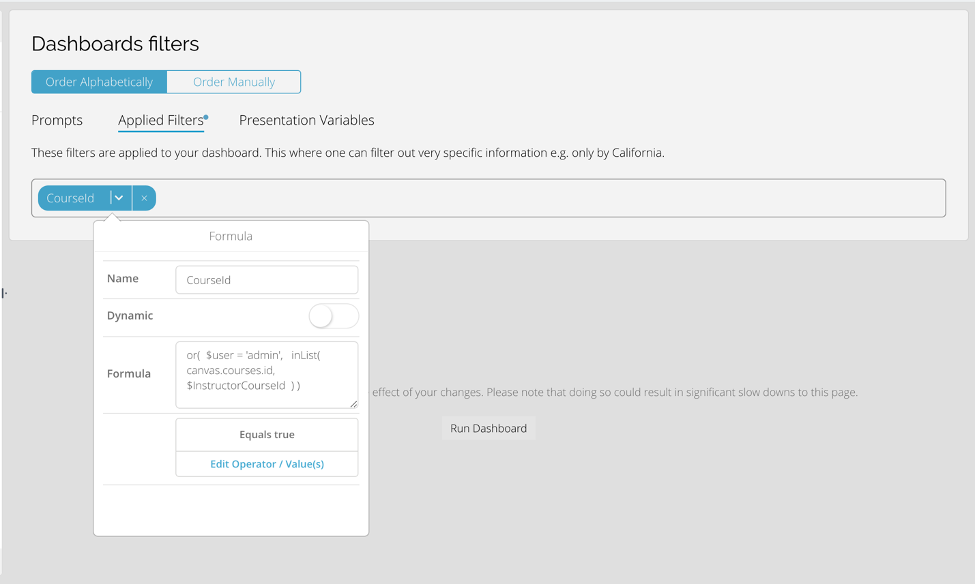
Let Instructor Dashboard default filter be available.
Assignments Table Add Formula Columns

case(
 and(
 canvas.assignments.unlock_at <= $currentDate,
 canvas.assignments.lock_at >= $currentDate
 ),
 'Available',
 canvas.assignments.unlock_at > $currentDate,
 'Future',
 canvas.assignments.lock_at < $currentDate,
 'Past',
 canvas.assignments.due_at < $currentDate,
 'Past',
 canvas.assignments.due_at > $currentDate,
 'Future',
 'Others'
)
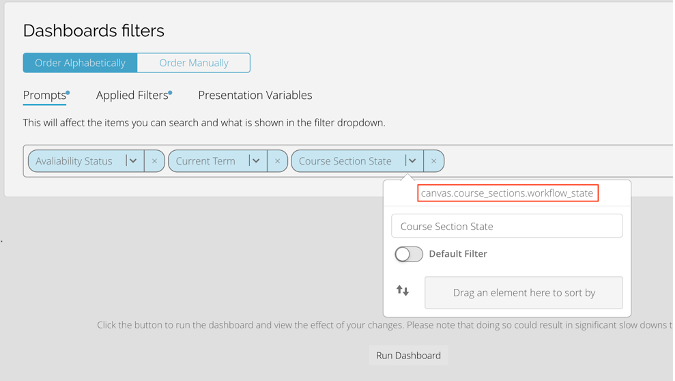
Prompts Filter
Availability Status

Current Term


Course Section State


Comments